
Problem: the scene is linear, but I want solutions
The AI generated a scene from your idea. It reads well, but it goes clumsily: line after line, without solutions. The player is just an observer, but I want him to be a full participant.
How an ordinary choice Turns a banal Scene into a Real game
The choice pulls the player out of the spectator's seat and makes him the main character. When a story freezes on a question and waits for a solution, then just one fork can divide everything into before and after.
And you don't even have to invent anything: just add buttons inside the dialog.
Step 1 - Open the scene in the graph editor
Open the generated scene in your project. The dialogue is shown as connected nodes - each line a speech node in a chain. Find the node where you want the player to decide.
Step 2 - Add two options to a line
On the speech node for that beat, click + Add option to add a choice. Each option is an answer the player can pick, and each gets its own outgoing path.
For the café scene, after the turning-point line, add two options:
- Click + Add option once and type the first reply - the "Yes" answer.
- Click + Add option again and type the second - the "No" answer.
The option text is what the player sees and clicks. Write it the way you'd present a real choice.
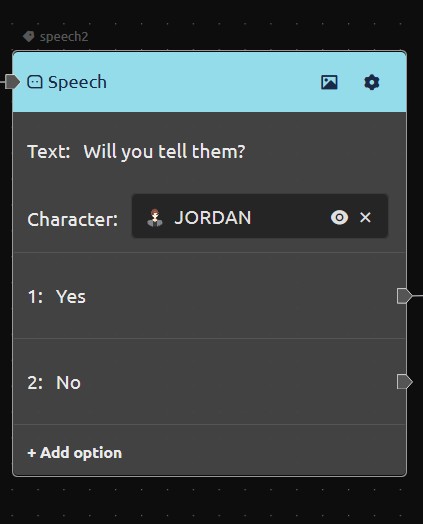
Step 3 - Wire each answer to its own path
Each option leads to its own branch of the story. From the first option's output, connect it to the node that should play if the player says 'yes' . From the second option's output, connect it to the node that should play if they say 'no'.
Because every option has its own independent connection, the two answers run different lines from that point on. The scene is no longer linear.
Step 4 - Test the choice in the editor
Play the scene with the Play button on the toolbar. When the scene reaches the decision, each option shows a Select button. Click one, follow its branch, then restart and click the other to confirm both paths work.
What you solved today
- You added two options to a speech node - yes and no.
- You connected each answer to its own branch.
- You tested both paths in the editor.
What's next: variables
Next we add variables, so the story can remember the decision and react to it later.
Try it now: open your scene in the editor, pick a beat, and add two options with + Add option. Wire each to a different path and test both.
FAQ
How do I add a choice to a line?
On a speech node, click + Add option and type the answer. Each option gets its own outgoing connection.
Can Yes and No lead to different outcomes?
Yes. Each option routes independently, so the first and second answers can continue to completely different nodes.
What's the difference between options and a branch node?
Options are for the player - the player clicks an answer. A branch node is for the engine - it routes based on a condition, not a player click.
How do I test my choices?
Use Play on the toolbar. Each option shows a Select button during playback; pick one, follow it, restart, and pick the other.
Can I add more than two options?
Yes. Add as many as you need, each gets its own path.